 Daniel Awde
TopTimer is a native, open-source macOS menu-bar timer for countdowns and stopwatches. It runs offline, needs no account, and keeps every timer, preset, setting and history entry on your Mac. I built it, and the source is on GitHub under the MIT license.
This note covers what it does, the decisions behind it, and what it deliberately does not do yet.
What TopTimer does
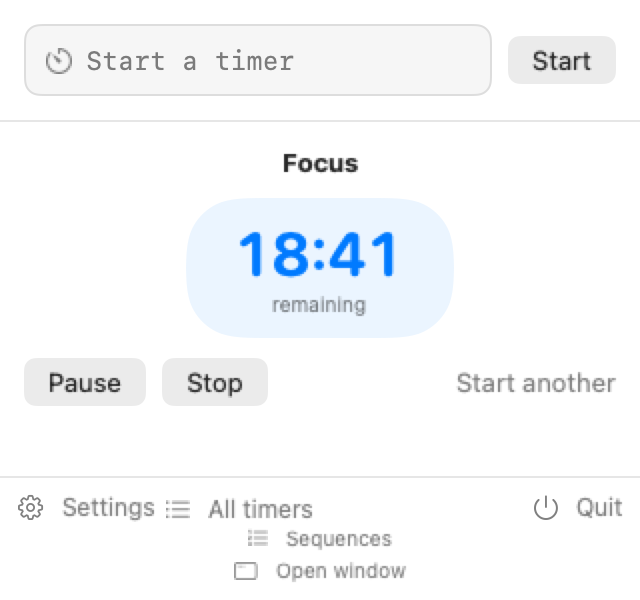
You type a command into the menu-bar popover and press Return. The parser accepts the shapes people already use:
15m Tea #homestarts a 15-minute countdown titled Tea, taggedhome.1h 20m,60sand1:30:45are compound, seconds and clock-style durations.@3pmor@14:30counts down to the next matching wall-clock time.stopwatch reading #booksstarts a named stopwatch, and blank input with Start begins one at00:00.
Around that sits the usual timer surface: several timers running at once, pause, resume, restart, duplicate and edit, plus completion notifications with Stop, Repeat and Snooze actions. History can be searched, filtered and exported as UTF-8 CSV. A sequence feature chains tasks so only the current one runs; the default is three tasks of 15, 15 and 30 minutes, repeating endlessly.
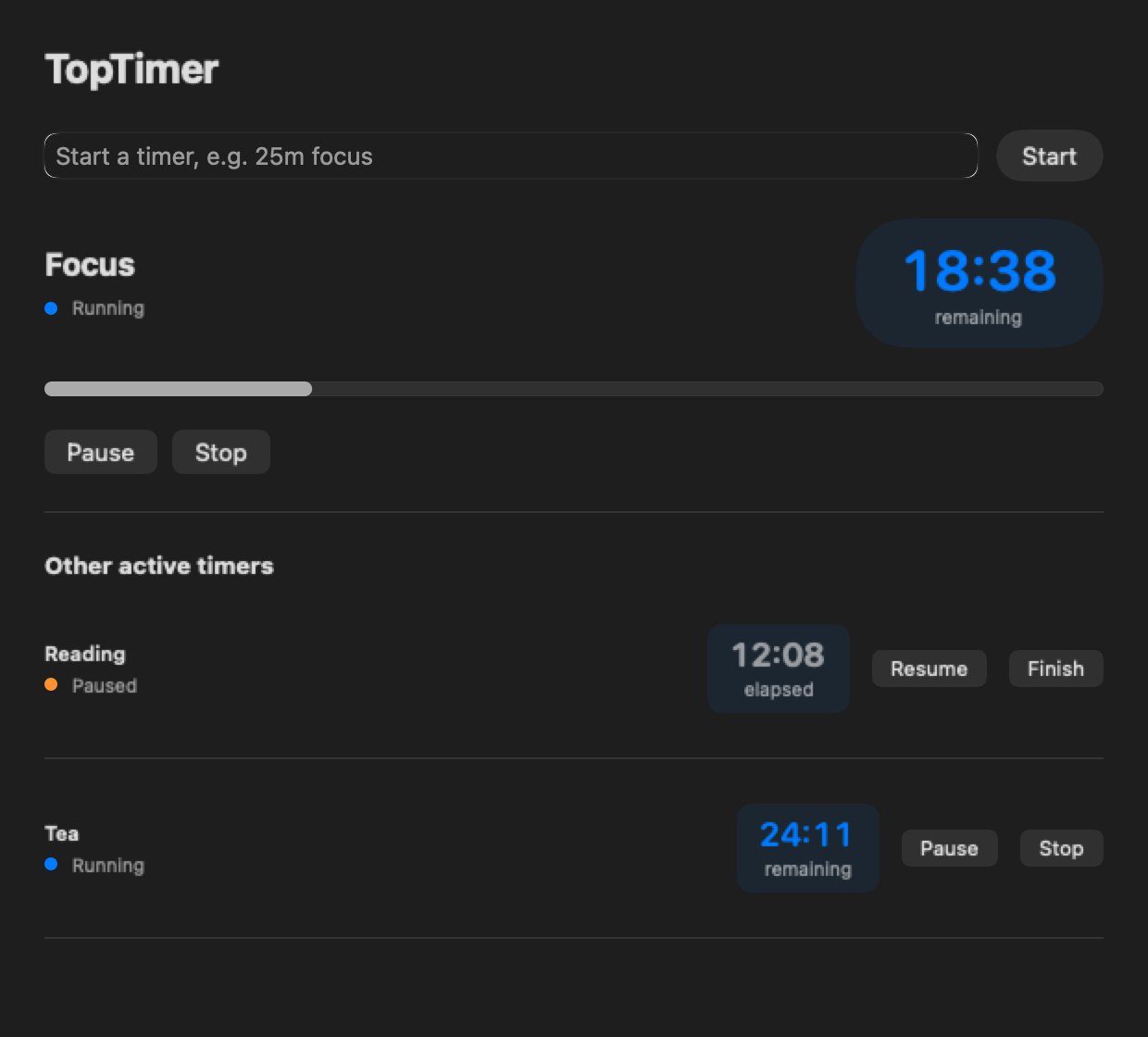
With several timers active, the menu bar shows the countdown due soonest, or the oldest running stopwatch. Clicking it reveals everything else. That rule keeps the menu bar compact while every running timer stays one click away.
Why native, not cross-platform
I chose SwiftUI with small AppKit integration points, targeting macOS 13.5 and later. A menu-bar utility lives or dies on the platform APIs it touches: the menu bar, notifications, login items, global keyboard shortcuts and power management. A native app reaches those directly and installs small.
The cost is plain. There is no Windows or Linux build, and a cross-platform version would be a new architecture decision, not a port.
The Swift package is split into layers: a domain library, a persistence library, a system-integration library, the app library and a thin executable. Timer rules live in the domain layer, which does not import the app.
Why the data never leaves your Mac
TopTimer has no account, analytics, telemetry, cloud sync or network feature. Timers, presets, settings and history sit in a local Core Data store under your user Library. Logs deliberately omit timer titles, descriptions, tags and exported rows.
A timer app has no reason to hold your data on a server. Sync would need its own privacy, conflict-resolution and availability design, so it is not a switch I can flip later.
Two small decisions that were not small
Wall-clock times and daylight saving. If you enter @2:30 and that time does not exist because the clock springs forward, TopTimer advances to the next valid local time, so 2:30 becomes 3:00. If a local time occurs twice, it takes the first occurrence that is still later than now. Rejecting the input would have been simpler to code, but a predictable next alarm is a better answer than an error at a moment the user cannot control.
Recurring timers. Completing a recurring countdown creates exactly one running successor whose deadline is the next scheduled occurrence. Its duration is the window from completion to that deadline. That keeps pause, resume and restart coherent even when the next occurrence is days away, and one completion can never spawn a chain of alerts.
Fields are bounded on purpose: a short title, a description up to 500 characters, and up to 12 tags of 32 characters each. Explicit limits keep storage, search, notifications and CSV export predictable.
Sequences, sounds and cleanup
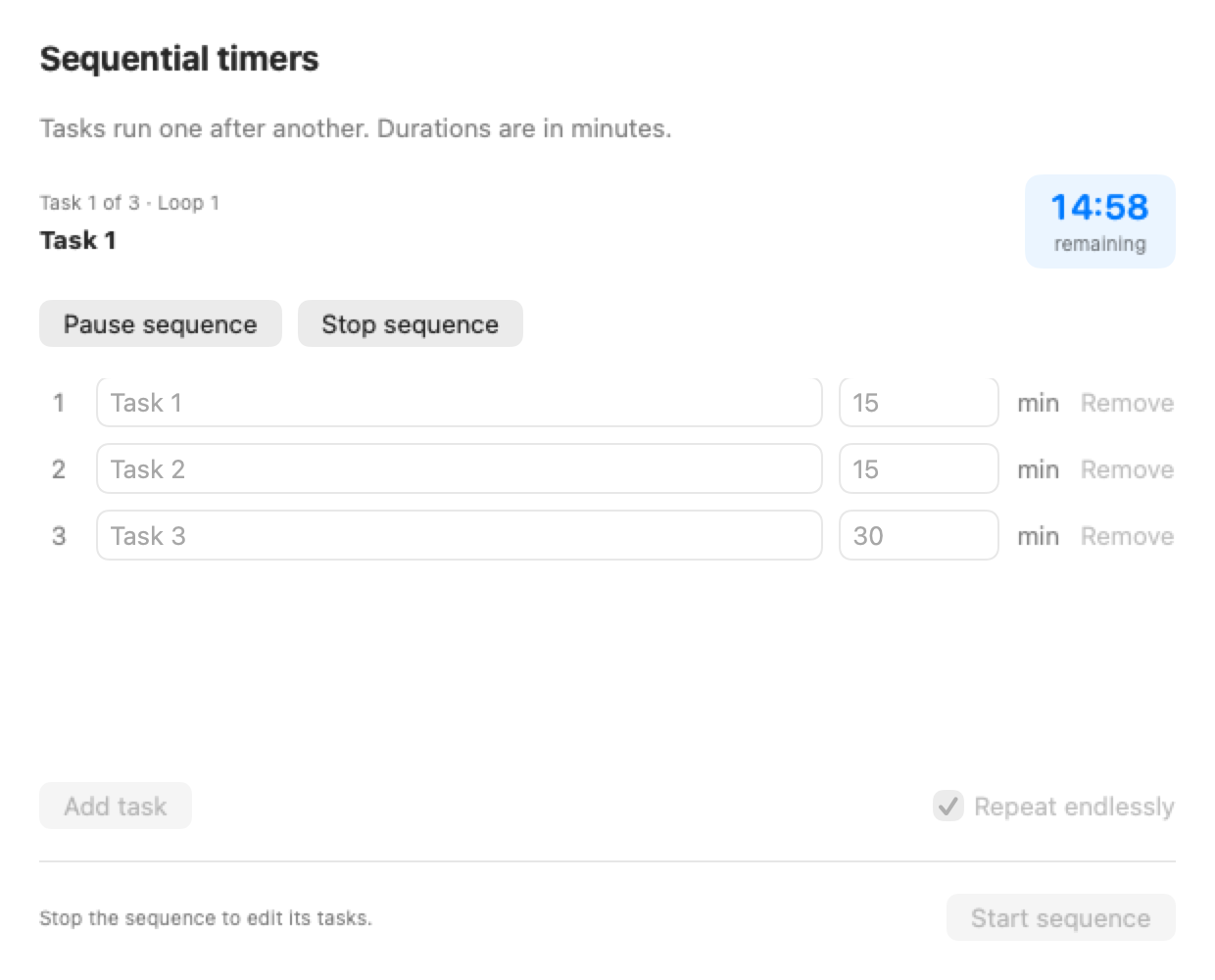
Sequences. Open Sequences from the popover, edit the task names and minutes, add or remove rows, and choose Start sequence. Only the current task runs. Each finished step goes to history, and the saved sequence resumes when the app relaunches. Automatic transitions need TopTimer to keep running; after a quit or a delayed wake-up, the next task starts when the app resumes.
Sounds. Each timer can use a built-in or imported sound with its own playback volume. macOS controls notification volume separately, and if a custom sound is unavailable the app falls back safely instead of staying silent.
Cleanup. Delete all timers removes every timer but keeps history and saved suggestions. Clear everything also removes history, deleted records, suggestions and the saved sequence, while settings and imported sounds stay. Both actions ask for confirmation, because a destructive button that does not ask is a bug waiting for a stray click.
The settings cover global shortcuts, launch at login, clock format, menu-bar display, retention, snooze duration and whether to prevent idle sleep while timers run.
What it does not do yet
- Apple silicon only. The local package is
arm64. I do not claim an Intel binary. - Not notarized. The build is ad-hoc signed, fine for local use, but not Developer ID signed or notarized. That needs an Apple Developer identity. The v0.1.0 release on GitHub is a tag with no attached binary, so there is no download yet and you build it from source.
- No sync, and no other platforms.
Build it
You need Xcode with the Swift 6 toolchain. From the repository root:
swift test
swift build -c release -Xswiftc -warnings-as-errors
bash scripts/package-app.sh
bash scripts/verify-app.sh build/TopTimer.app
The package script produces build/TopTimer.app, which you can copy into /Applications. To remove it, quit the app and move that bundle to the Trash; your data stays in ~/Library/Application Support/TopTimer until you delete it.
The same approach shows up in my other build note on Budget Tracker, and the way I write down acceptance conditions is in Requirements for an AI Automation. More writing is on the blog.
FAQ
Is TopTimer free?
Yes. TopTimer is released under the MIT license with no paid tier, and every implemented feature is available. You can read, build and modify the source on GitHub. There is no account to create and nothing to subscribe to, which follows from the app having no server side at all.
Does TopTimer send any data anywhere?
No. It has no analytics, telemetry, account, cloud sync or network feature. Timers, presets, settings, sounds and history stay in your user Library on your Mac, and logs leave out titles, descriptions and tags. CSV exports contain the history fields you choose, so treat those files as personal data.
Which Macs does it run on?
It needs macOS 13.5 or later. The package built from the repository is Apple silicon (arm64) only, and no Intel build is claimed. Building it requires Xcode with the Swift 6 toolchain, and the repository’s test and packaging commands work from the repository root.
Can it repeat a timer every weekday?
Yes. Recurrence can be none, an interval, daily, weekdays, a weekly day and time, or selected weekdays. Completing a recurring countdown creates exactly one running successor scheduled for the next occurrence, so repeats never pile up into a chain of overlapping alerts.
Why is there no signed download?
The local build is only ad-hoc signed. A public binary needs Developer ID signing, hardened-runtime review and notarization under an Apple Developer identity, which sits outside the repository’s scripts. The v0.1.0 release is a tag without a binary, so for now you build TopTimer from source.